

Blades are the working heart of any plastic granulator. On the SWHB1000, dull or misaligned blades show up fast: higher motor load, uneven particle size, more fines, and extra wear on the screen and bearings. Replacing the rotary and static blades on schedule keeps output stable and avoids the unplanned stops that cost far more than a blade set. This guide walks through the full replacement procedure step by step, with the exact torque values and clearances for the SWHB1000.
Safety First
Blade replacement means working inside the cutting chamber with sharp edges and heavy components. Before you start:
- Lock out and tag out the main power supply. Confirm zero energy at the control cabinet before opening anything.
- Wear cut-resistant gloves, safety glasses, and steel-toe boots. New granulator blades are extremely sharp.
- Keep hands clear of the rotor at all times — treat the chamber as live until the job is done and the housing is closed.
- Have a second person nearby when lifting the hopper or handling blade sets.
Tools and Parts You’ll Need
- 17 mm internal hex wrench (rotary blade bolts)
- 27 mm external hex socket wrench (static blade bolts)
- Torque wrench rated to at least 600 N·m
- Feeler gauges (0.3–0.4 mm range) for blade gap setting
- Replacement blade set: 10 rotary blades with 20 bolt sets, 4 static blades with 16 screw sets, plus new washers
SWHB1000 Blade Replacement: Step-by-Step
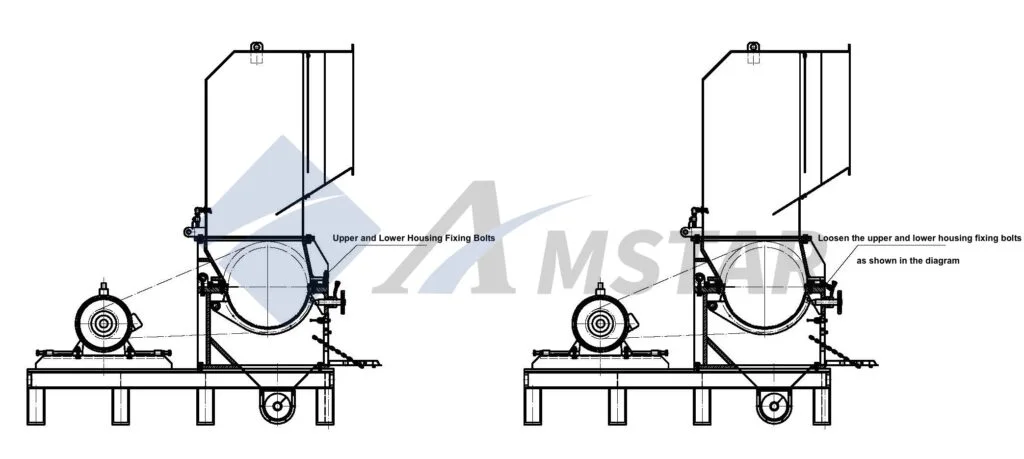
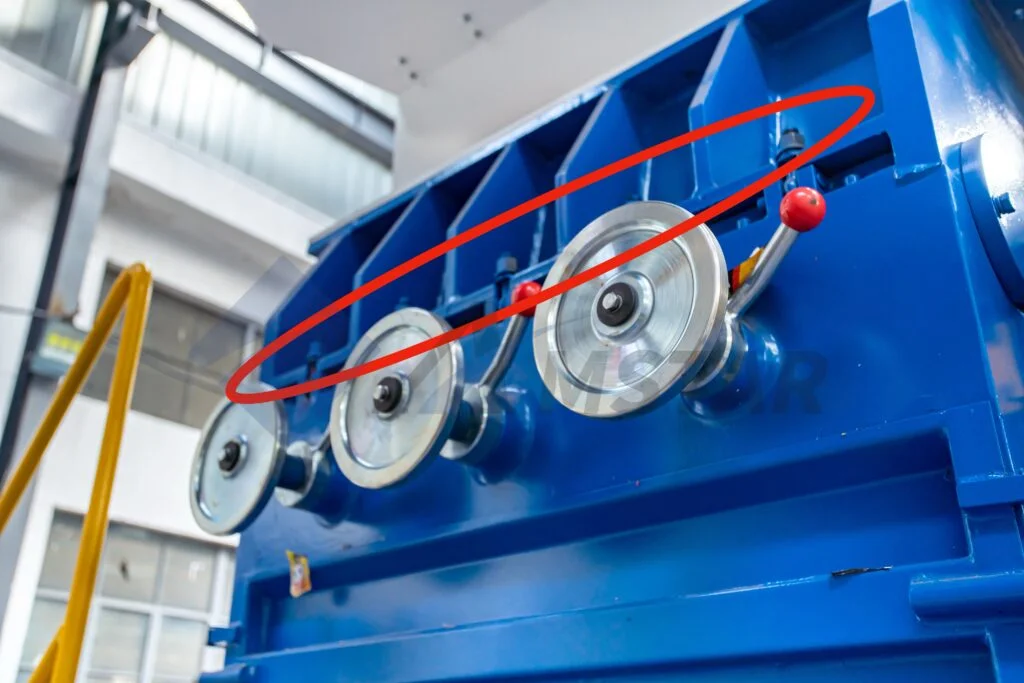
1. Loosen the upper and lower housing fixing bolts. With the granulator safely powered off, loosen the upper and lower housing fixing bolts using the appropriate tools, as indicated in the diagram. This gives access to the granulator chamber.
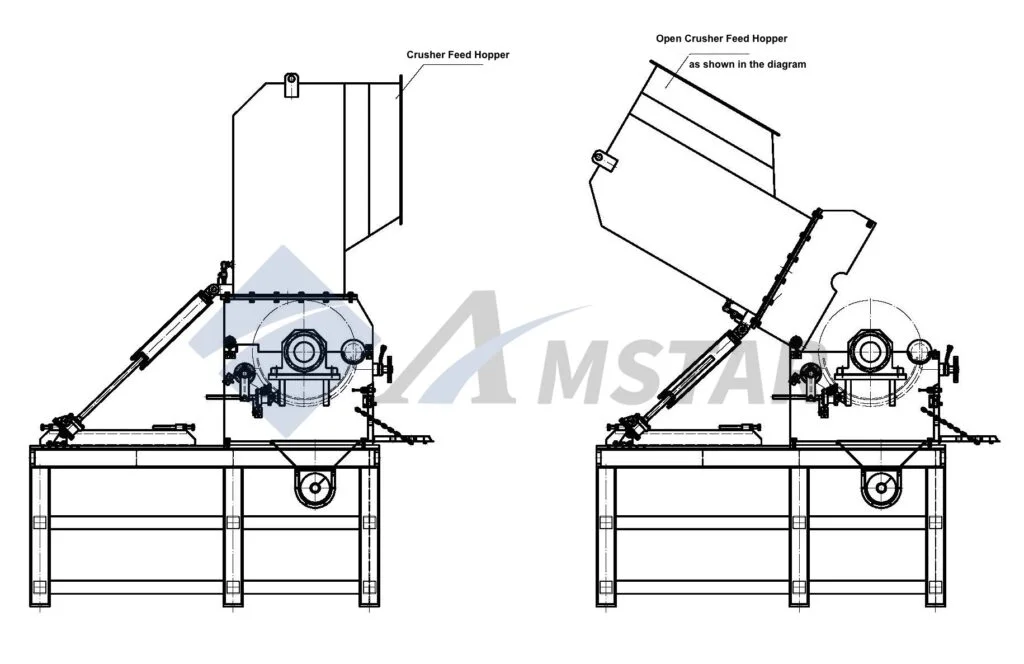
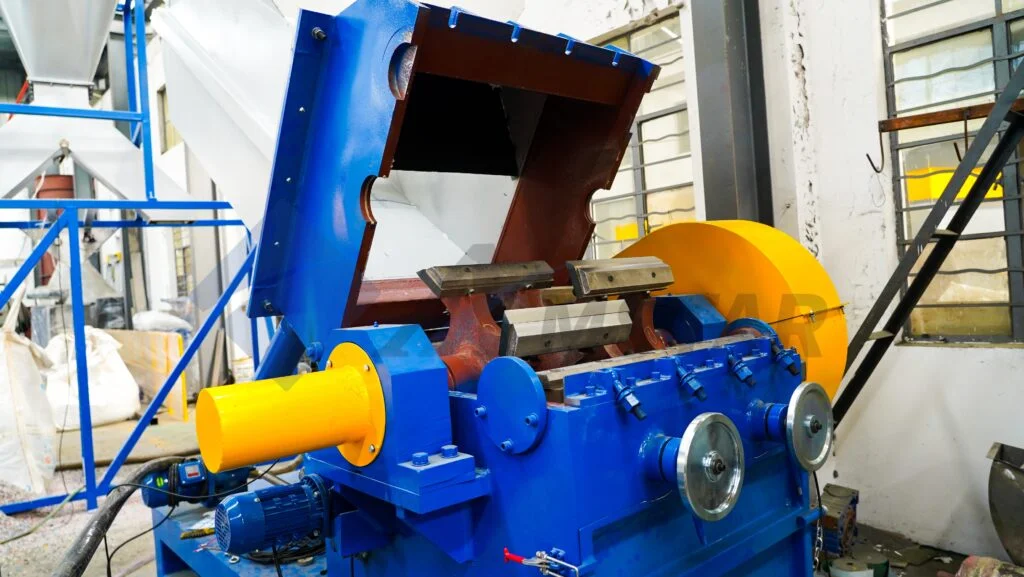
2. Open the granulator feed hopper. Set the manual/automatic switch on the electric box door to the manual position, then press the opening button. The hopper opens to approximately 60% of its full range — at this position the static and rotary blade bolts inside the chamber are visible and accessible for removal.
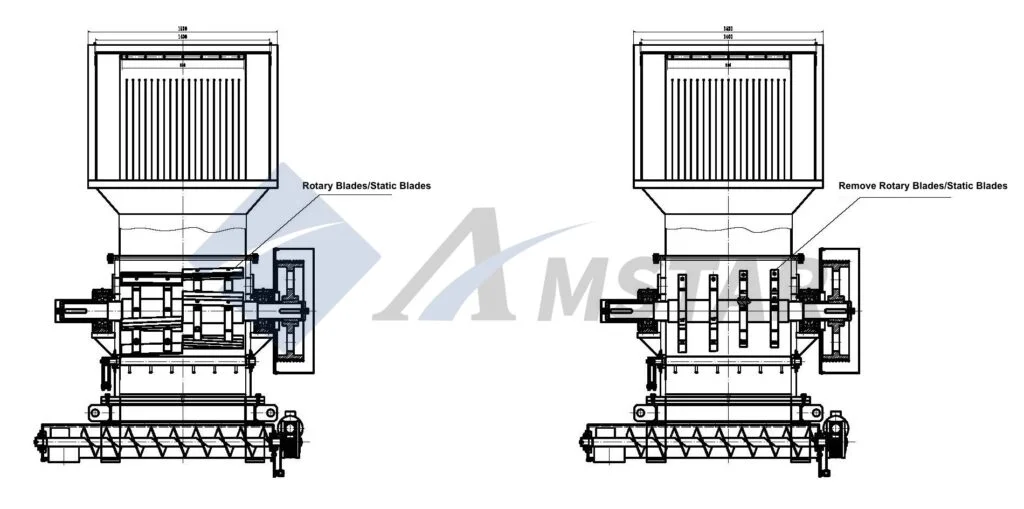
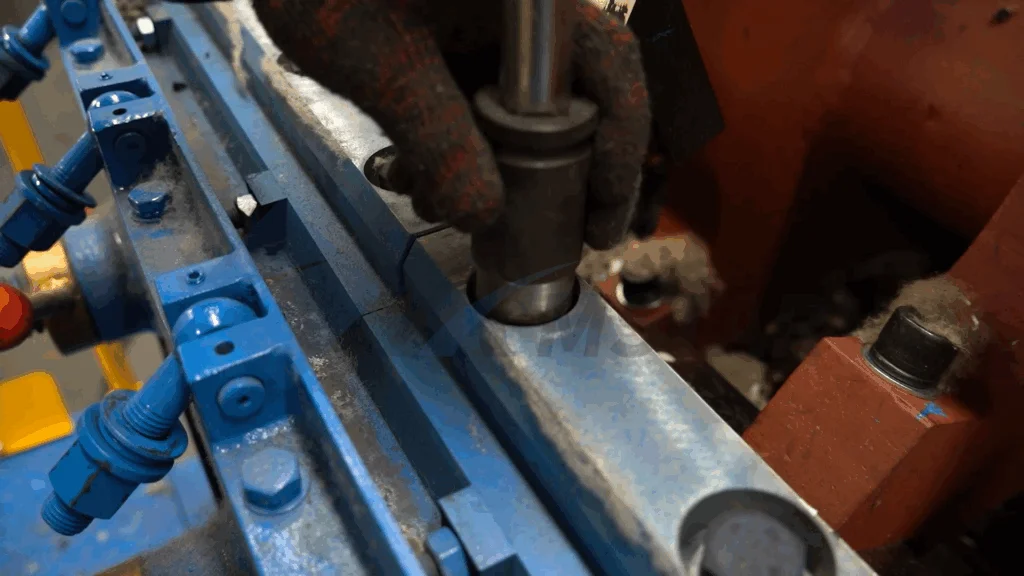
3. Remove the rotary and static blades. Turn off the circuit breaker inside the electric box and hang a maintenance sign so the machine stays de-energized. Use the 17 mm internal hex wrench to remove the rotary blade bolts and the 27 mm external hex socket wrench for the static blade bolts. The SWHB1000 carries 10 rotary blades with 20 sets of bolts and 4 static blades with 16 sets of screws. Inspect every screw and washer as you remove it — replace any damaged fasteners rather than reusing them.
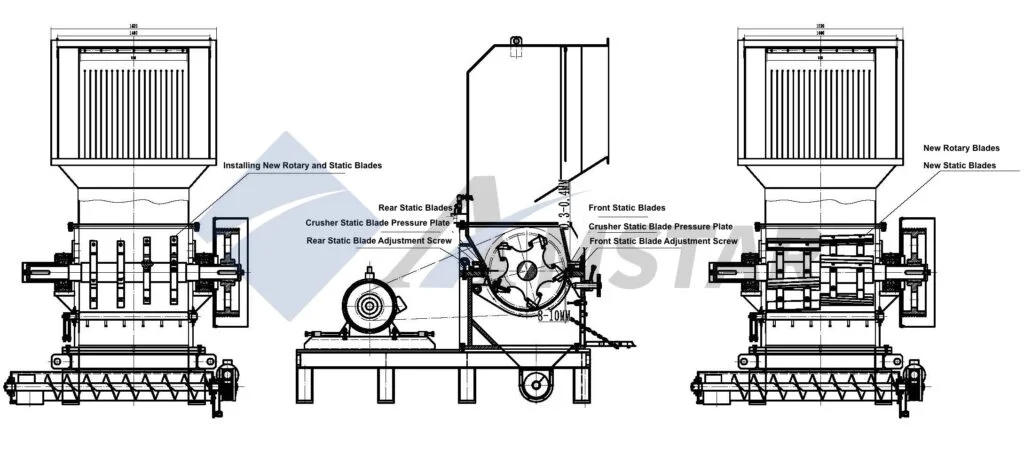
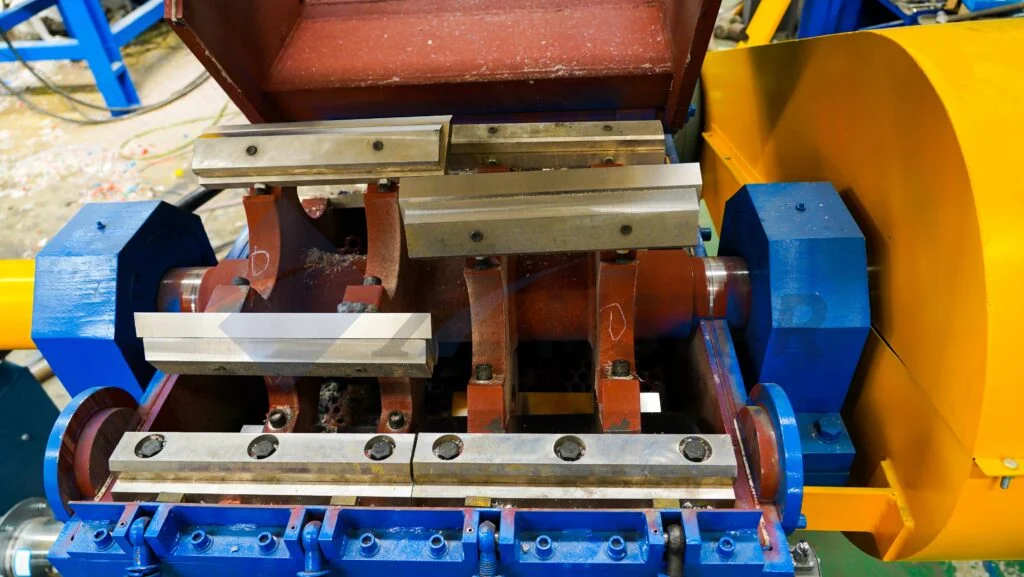
4. Install the new rotary and static blades. Alignment and torque are what decide blade life — take your time here:
- Front static blades: Install the two front static blades and pressure plates first, with blade protrusion set to 8–10 mm. Tighten the screws to 480 N·m and secure the adjustment screws.
- Rotary blades: Fix all rotary blades and pressure plates. Using the rotary blade adjustment screws, set the gap between the rotary blades and the front static blades to 0.3–0.4 mm. Tighten the rotary blade screws to 576 N·m and lock all adjustment screws.
- Rear static blades: Install the two rear static blades and pressure plates, adjusting the gap between rotary and rear static blades to 0.3–0.4 mm. Tighten to 480 N·m and secure the adjustment screws.
- Final check: Recheck every screw for tightness. Confirm no bolt is missing or loose before moving on.
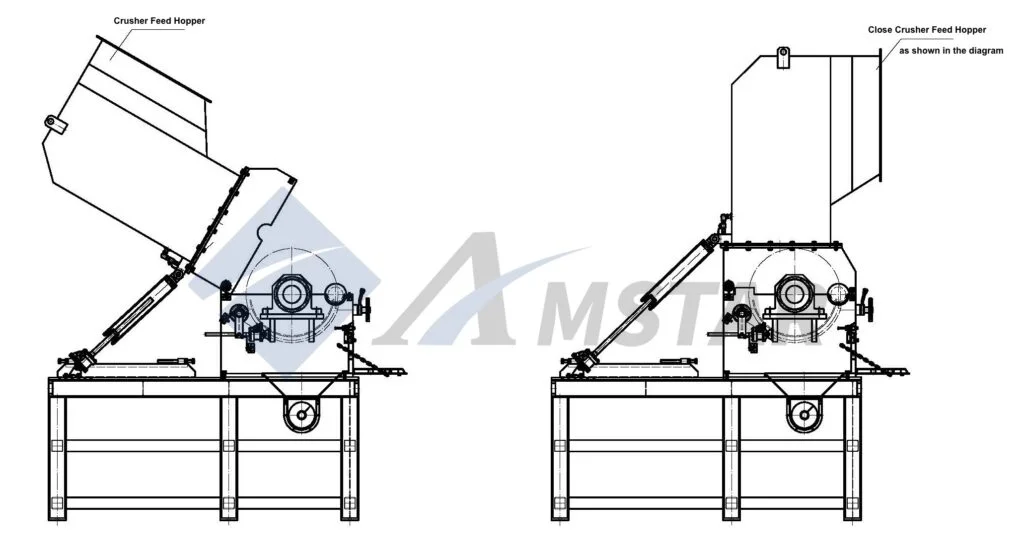
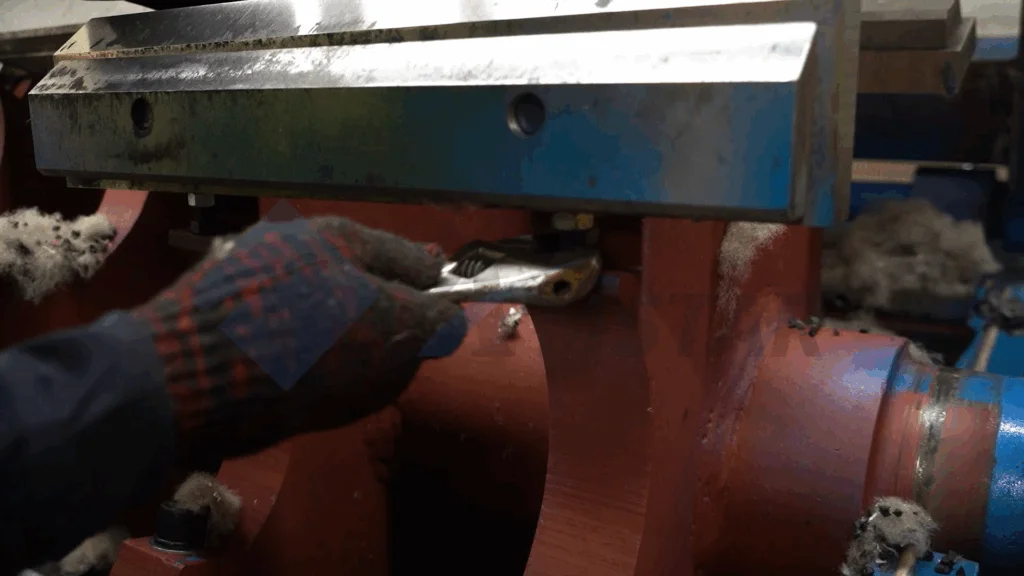
5. Close the feed hopper. Clean all debris out of the chamber first — a stray bolt or tool left inside will destroy new blades on startup. Power on the electric box, set the switch to manual mode, and press the closing button. The hopper closes automatically when it reaches the limit switch.
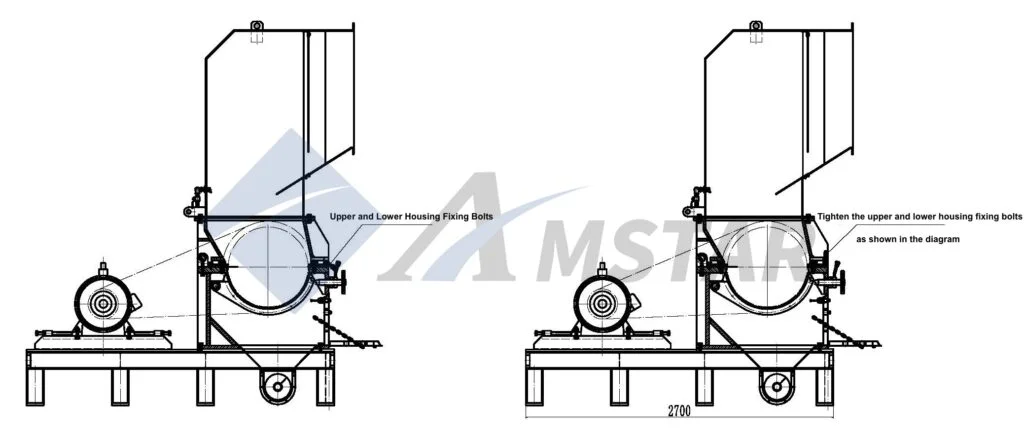

6. Tighten the upper and lower housing fixing bolts. Secure the housing with the fixing bolts as shown in the diagram. The granulator is now ready for a test run — start it empty, listen for any abnormal contact noise, and only then introduce material.
Maintenance Tips to Extend Blade Life
Blades don’t have a fixed calendar life — feedstock decides it. Clean post-industrial scrap is gentle; post-consumer bales with sand, grit, or the occasional metal fragment eat edges fast. A few practices stretch every blade set further:
- Keep metal out. A metal detector or magnetic separator ahead of the granulator is the single best blade insurance in a rigid plastic recycling line.
- Watch the gap. Check the 0.3–0.4 mm blade gap during scheduled stops. A widening gap means more fines and higher power draw — the early warning before edge failure.
- Rotate, don’t just replace. Many operators keep two blade sets in rotation: one in the machine, one at the sharpener. Regrinding is economical as long as the blade hasn’t lost too much width.
- Retorque after break-in. Check all blade bolts after the first 8 hours of operation on new blades — settling is normal, a loose blade is not.
Frequently Asked Questions
How often should granulator blades be replaced?
There is no fixed interval — it depends on feedstock and throughput. Signs it’s time: rising motor current at the same feed rate, more fines in the output, or visibly rounded cutting edges. Plants running dirty post-consumer material inspect weekly; clean post-industrial lines can go much longer.
What is the correct blade gap on the SWHB1000?
Set the gap between rotary and static blades to 0.3–0.4 mm using feeler gauges, both front and rear. Too wide a gap produces fines and overloads the motor; too tight risks blade contact and catastrophic damage.
What torque values do the blade bolts need?
Static blade screws: 480 N·m. Rotary blade screws: 576 N·m. Always use a calibrated torque wrench, tighten in stages, and secure the adjustment screws afterward. Recheck torque after the first 8 hours of operation.
Can I sharpen granulator blades instead of replacing them?
Yes, as long as the blade retains enough width and has no cracks or chipped sections. Most plants keep a spare set in rotation so the machine never waits for sharpening. Once a blade has been ground past its usable width, replace it.
How many blades does the SWHB1000 use?
10 rotary blades secured with 20 sets of bolts, and 4 static blades (two front, two rear) secured with 16 sets of screws. Replace screws and washers that show any damage during the change.
What tools are needed for the job?
A 17 mm internal hex wrench for the rotary blade bolts, a 27 mm external hex socket wrench for the static blade bolts, a torque wrench rated to at least 600 N·m, and feeler gauges for setting the 0.3–0.4 mm gap.
Why is my granulator drawing more power than usual?
Dull blades are the most common cause — the motor works harder to tear rather than cut. Check blade edges and the cutting gap first. Other suspects: a worn or blinded screen, overfeeding, or material wrapping on the rotor.
Should I replace the screen at the same time as the blades?
Inspect it while the chamber is open. If the screen shows worn or enlarged holes, replace it together with the blades — a worn screen undoes the particle-size consistency that new blades deliver. It’s also the cheapest time to do it, since the machine is already down.
Where can I get genuine SWHB1000 blade sets and support?
Use the inquiry form below or our contact page to request blade sets, screens, and other wear parts. Our service team can also advise on blade maintenance schedules for your specific material and throughput.
INQUIRIES
For blade sets, screens, and other wear parts — or any technical question about the SWHB1000 — send us a message using the form below: